featured drop · runner
Play Ruby Raid Online - Free Browser Game
Sprint through an auto-runner chase, collect weapons and gems, and survive escalating arcade pressure.
Recommended games
Similar energy to keep the flow going
Newest Games
Just added to the forest roster







Ruby Raid guide
Overview, how to play, tips, and FAQs
1. Game Overview
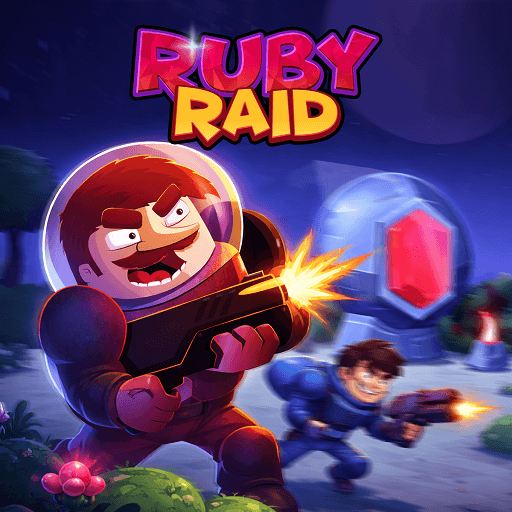
Ruby Raid throws you straight into the consequences of a bad decision: stealing a sacred ruby from a powerful deity known as the Eye God. What follows is a relentless, forward-only chase where a deadly laser beam pursues your treasure-hunter hero across an obstacle-filled path, and stopping — even for a moment — means instant death. It's a runner-shooter hybrid that leans fully into its premise, turning every second of the chase into a tense balance between forward momentum and precise obstacle management.
The gameplay splits your attention in two directions at once: your character dashes forward automatically, but a stream of obstacles — blocks, barriers, worshippers — stands between you and survival, requiring quick jumps and well-timed shots to clear a path. All the while, the pursuing laser never really lets up, punishing any hesitation or mistimed obstacle response with an instant end to the run. Collecting rubies along the way adds a resource-gathering layer on top of the pure survival challenge, giving you something to work toward beyond simply outlasting the chase.
With over 25 unlockable weapons, each offering different power and abilities, Ruby Raid gives dedicated players a real reason to keep pushing further, since better firepower makes the increasingly difficult later runs more manageable. Combined with dead-simple controls — jump with one key, fire with another — it's an easy game to pick up immediately, while its escalating difficulty curve keeps experienced players coming back to beat their previous distance record.
Key Details:
- Genre: Endless Runner / Auto-Runner Shooter
- Difficulty Level: Medium to Hard (escalating with each run)
- Average Play Time: 5-10 minutes per run
- Best For: Fans of endless runners, chase-based arcade games, and weapon-collection progression
2. How to Play
Getting Started:
- Start your run as your character automatically dashes forward.
- Jump over obstacles blocking your path using the left arrow key.
- Fire your weapon at obstacles or enemies using the right arrow key.
- Collect rubies scattered throughout the run whenever possible.
- Use accumulated rubies to unlock new guns and improve your chances on future runs.
Basic Controls:
| Action | Control |
|---|---|
| Jump | Left Arrow Key |
| Fire Weapon | Right Arrow Key |
Objective: Outrun the pursuing laser as long as possible by dodging or shooting through obstacles, collecting rubies along the way, and reaching the target distance before getting caught.
3. Game Features & Highlights
- Unique blend of auto-runner momentum and active shooting mechanics
- Relentless laser chase that punishes any hesitation instantly
- 25+ unlockable weapons, each with distinct power and abilities
- Simple, intuitive controls focused on jumping and shooting
- Progressive difficulty that intensifies with each successive run
4. Tips & Strategies
Beginner Tips:
- Focus purely on obstacle timing before worrying about collecting every ruby along the path.
- Keep a steady rhythm between jumping and shooting rather than reacting late to obstacles.
- Use early runs to learn common obstacle patterns rather than expecting to survive a long distance right away.
Advanced Strategies:
- Prioritize weapon upgrades that clear obstacles more efficiently, since faster clearing reduces the risk of the laser catching up.
- Learn to distinguish between obstacles that require jumping versus shooting to save reaction time.
- Balance ruby collection against safety — skip a ruby if grabbing it risks a mistimed obstacle response.
What to Watch Out For:
- Slowing down or hesitating near an obstacle, which gives the pursuing laser a chance to catch up.
- Overcommitting to ruby collection at the expense of clean obstacle avoidance.
5. Game Elements Explained
Automatic Forward Movement & Obstacle Timing: Since your character moves forward automatically at all times, Ruby Raid's core skill lies entirely in reacting to obstacles with correct timing — jumping over some, shooting through others. This design removes movement speed as a variable, focusing all of the challenge on split-second decision-making about which obstacle response to use and when. Players who master this rhythm can maintain a smooth, uninterrupted pace that keeps the pursuing laser at a safe distance.
The Laser Chase Mechanic: The pursuing laser beam is the game's core pressure system, constantly closing the distance if you slow down or get stuck. Because there's no way to pause or recover once caught, the chase mechanic reinforces a "keep moving, no exceptions" playstyle. This constant pressure is what elevates Ruby Raid above a standard obstacle-course runner, since even a single mistimed jump or shot can end the run instantly rather than just costing a small penalty.
Weapon Collection & Progression: With over 25 unlockable weapons, each offering different power and abilities, Ruby Raid rewards players who consistently collect rubies and reinvest them into their arsenal. Stronger weapons make clearing obstacles faster and more reliable, which becomes increasingly important as later runs introduce tougher, more frequent obstacles. Prioritizing weapon unlocks that suit your reaction speed and playstyle is key to extending your survival distance over time.
6. Frequently Asked Questions
Q: How do I avoid getting caught by the laser?
A: Keep moving forward smoothly by jumping and shooting through obstacles without hesitation — any significant slowdown lets the laser close the distance.
Q: What should I do if I keep dying early in a run?
A: Focus purely on obstacle timing before chasing rubies, and consider using a more reliable early-game weapon rather than a riskier high-power option.
Q: Is this game compatible with mobile browsers?
A: Ruby Raid uses arrow-key controls, so it's best suited to desktop browsers; mobile compatibility may vary depending on on-screen control support.
Q: Can I save my progress?
A: Collected rubies and unlocked weapons are generally saved within your browser session as you play across multiple runs.
Q: How do I unlock new weapons?
A: Collect rubies during your runs and spend them in the weapon unlock menu to expand your arsenal with new guns.
7. Related Games You Might Enjoy
If you like Ruby Raid, you might also enjoy:
- Track Dash - It shares a arcade focus while offering a different browser-game challenge.
- Wave Rider - It shares a arcade focus while offering a different browser-game challenge.
- Crazy Taxi - It shares a arcade focus while offering a different browser-game challenge.
Sort byNewest
Add a Comment
Fan-made hub; not affiliated with the official owners of 99 Nights.