featured drop · timing
Play Wacky Steps Online - Free Browser Game
Control awkward steps with precision timing in a funny arcade challenge where balance is the real enemy.
Recommended games
Similar energy to keep the flow going
Newest Games
Just added to the forest roster





Wacky Steps guide
Overview, how to play, tips, and FAQs
1. Game Overview
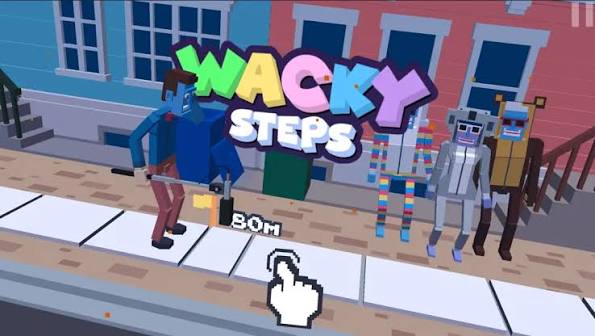
Wacky Steps takes something as mundane as walking down a sidewalk and turns it into a genuinely tense timing challenge, wrapped in ragdoll physics comedy that makes every failure just as entertaining as every success. Controlling a blocky, floppy character, your only job is to take steps forward without tripping — but the length and timing of each step is entirely in your hands, and getting it wrong sends your character tumbling in dramatically awkward fashion.
The core mechanic is deceptively simple: a short tap produces a short step, while holding the button longer produces a longer stride. That single input controls everything, but the sidewalk ahead is littered with cracks and hazards that punish both overly short and overly long steps depending on their exact placement. This turns what sounds like a trivial task into a genuine test of precision and pattern-reading, since success depends on judging the exact right step length for each specific stretch of pavement rather than settling into a repetitive rhythm.
Beyond the core walking challenge, Wacky Steps layers in a coin-collection system tied to distance traveled, letting players unlock new characters, outfits, and environments as they improve their high scores. It's an easy game to understand in seconds, but the combination of unpredictable hazard placement and satisfying ragdoll failure animations gives it real replay value for players who enjoy quick, skill-based arcade challenges.
Key Details:
- Genre: Arcade / Precision Timing
- Difficulty Level: Medium (simple mechanic, high precision demand)
- Average Play Time: 5-10 minutes per session
- Best For: Fans of precision-timing arcade games and physics-based comedy
2. How to Play
Getting Started:
- Click or tap to take your character's first step forward.
- Adjust step length by holding the button longer for a bigger stride or tapping briefly for a short one.
- Watch the path ahead for cracks and obstacles before each step.
- Continue stepping carefully to travel as far as possible without falling.
- Collect coins along the way to unlock new characters, outfits, and environments.
Basic Controls:
| Action | Control |
|---|---|
| Take a step (length varies with hold duration) | Click or Tap |
Objective: Walk as far as possible down the street by timing and sizing each step correctly, avoiding sidewalk cracks and obstacles that end your run instantly.
3. Game Features & Highlights
- Simple yet demanding one-input mechanic controlling both step timing and length
- Ragdoll physics that make falls as entertaining as successful runs
- Coin collection system tied directly to distance traveled
- Unlockable characters, outfits, and environments for long-term variety
- Quick, replayable sessions ideal for chasing a new high score
4. Tips & Strategies
Beginner Tips:
- Take your time between steps to judge the upcoming path rather than rushing your inputs.
- Practice short taps and longer holds separately to get a feel for how step length scales with hold duration.
- Prioritize survival over coin collection on your first several attempts.
Advanced Strategies:
- Study the spacing of upcoming cracks a step or two in advance rather than reacting to only the immediate one.
- Develop a consistent tap rhythm for short steps and a separate hold rhythm for longer strides, rather than guessing each time.
- Balance coin collection with safety by only detouring for coins that don't require an unusually risky step length.
What to Watch Out For:
- Holding the input too long out of habit, overshooting into a crack that a shorter step would have cleared.
- Rushing consecutive steps without pausing to assess the next hazard, leading to avoidable falls.
5. Game Elements Explained
Step Length & Timing System: The single mechanic driving all of Wacky Steps is the relationship between hold duration and step length — a quick tap produces a short step, while a longer hold produces a longer stride. Because sidewalk cracks and hazards are placed at varying distances, no single step length works universally; players must judge each upcoming stretch individually and adjust their input accordingly. This system turns what looks like a one-button game into a genuine precision challenge, since misjudging distance by even a small margin ends the run.
Hazard Variety: Beyond simple sidewalk cracks, obstacles like cars and tricky gaps add further complexity to route-reading. Different hazard types may require different avoidance strategies — some might need a longer step to clear entirely, while others require a shorter, more cautious approach. Recognizing hazard types at a glance, rather than treating every obstacle the same way, becomes increasingly important as runs get longer and the pace of decision-making increases.
Coins & Unlockables: Coins scattered along the walking path reward both survival and collection instincts, funding unlocks for new characters, outfits, and environments. Since chasing a coin can occasionally require a riskier step than the safest path would call for, players need to weigh the value of a given coin against the danger of altering their step length just to reach it.
6. Frequently Asked Questions
Q: How do I control my step length?
A: Tap briefly for a short step, or hold the button longer for a bigger stride — timing and length work together to help you clear upcoming hazards.
Q: What should I do if I keep falling on cracks?
A: Slow down and study the spacing of the upcoming path before each step, adjusting your hold duration to match the exact gap you need to clear.
Q: Is this game compatible with mobile browsers?
A: Yes, Wacky Steps' simple tap-and-hold control scheme works well on both desktop and mobile browsers.
Q: Can I save my progress?
A: Coins and unlocked characters, outfits, and environments are generally saved within your browser session as you play.
Q: How do I unlock new characters and environments?
A: Collect coins during your runs and spend them in the unlock menu to access new characters, outfits, and environments.
7. Related Games You Might Enjoy
If you like Wacky Steps, you might also enjoy:
- Crazy Taxi - It shares a casual focus with a different browser-game twist.
- Flip Rush - It shares a casual focus with a different browser-game twist.
- Lift Off - It shares a casual focus with a different browser-game twist.
Sort byNewest
Add a Comment
Fan-made hub; not affiliated with the official owners of 99 Nights.