featured drop · puzzle
Play CAVING Game Online - Free Browser Game
Select tools, place them on cave grid blocks, and preserve consumables through compact survival runs.
Recommended games
Similar energy to keep the flow going
Newest Games
Just added to the forest roster





CAVING Game guide
Overview, how to play, tips, and FAQs
1. Game Overview
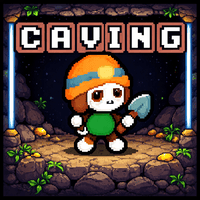
CAVING Game is a compact cave challenge built around careful input, tool selection, and surviving narrow spaces where small mistakes matter. The source page describes a minimalist experience and supplies mouse-based controls for selecting tools from a deck, placing them on grid blocks, and using consumables through the interface. That makes the game less about complicated commands and more about reading the current layout before committing a limited option.
The cave setting creates natural pressure. Routes are tight, safe positions are limited, and the next action can determine whether progress continues or a run ends. Players must look ahead, choose the correct tool for the obstacle, and avoid spending a consumable simply because it is available. The rules are quick to understand, but efficiency develops through repeated attempts and better recognition of what each grid situation requires.
Its main appeal is the short retry loop. Failure arrives quickly, yet restarting gives you another opportunity to apply one lesson and travel farther. Minimal visuals keep attention on the cave, the grid, and the active tool rather than on decorative systems. CAVING Game is well suited to brief browser sessions and players who enjoy personal-best challenges, deliberate placement, and games where mastery comes from controlled decisions. Because embedded versions can differ, the interface prompts remain the final authority for any action not documented on the source page.
Key Details:
- Genre: Cave Puzzle / Survival Arcade
- Difficulty Level: Medium to Hard
- Average Play Time: 5-15 minutes per run
- Best For: Players who enjoy compact retries, tool-based puzzles, grid decisions, and precision challenges
2. How to Play
Getting Started:
- Review the visible cave grid and the tools currently available in your deck.
- Click a tool to select it.
- Click the grid block where that tool should be placed or used.
- Open the deck or consumable interface only when another option is needed.
- Continue through the cave while preserving useful tools for harder sections.
Basic Controls:
| Action | Control |
|---|---|
| Select a tool | Left Mouse Click |
| Place the selected tool | Left Mouse Click on a grid block |
| Open deck / Use consumable / Navigate UI | Click the relevant interface button |
Objective: Use the available tools and consumables efficiently to continue through the cave, overcome grid obstacles, and improve your distance or run progress.
3. Game Features & Highlights
- ✓ A minimalist cave setting focused on readable decisions
- ✓ Tool selection and grid placement controlled entirely with the mouse
- ✓ A deck and consumable system that rewards resource discipline
- ✓ Quick failures and restarts that support steady mastery
- ✓ Personal-best progression suitable for short browser sessions
4. Tips & Strategies
Beginner Tips:
- Read what a tool does before placing it on the first available block.
- Keep one versatile option in reserve until the next section is visible.
- Make deliberate clicks; an accidental placement may be difficult to undo.
Advanced Strategies:
- Plan two or three grid actions ahead instead of solving only the current block.
- Use ordinary tools for routine obstacles and save consumables for emergencies.
- Compare failed runs to identify which early placement caused a later shortage.
What to Watch Out For:
- Spending rare tools too early can make an otherwise simple later section impossible.
- Rapid clicking may place an item on the wrong block before the selection is confirmed.
5. Game Elements Explained
Tool Deck and Grid Placement: The deck defines your available solutions. Selecting a tool does not create progress by itself; value comes from placing it on the block where its effect solves the most important problem. Before clicking, inspect neighboring blocks and consider what route remains afterward. A placement that clears the current obstacle but blocks a later path is only a temporary success. Learn the role of each tool through its tooltip or early safe use, then assign it a priority: common tools handle routine situations, specialized tools answer specific patterns, and consumables protect the run when no normal option works. Because a mouse click can commit the choice immediately, confirm both the selected icon and destination block. Over repeated attempts, tool recognition becomes faster and the grid feels less random. Mastery is the ability to preserve flexibility while still advancing. When several options look reasonable, favor the one that leaves an escape route or spare resource afterward. Flexible decisions may appear slower, but they prevent one surprise from turning a recoverable situation into immediate failure.
Run Management and Personal Progress: CAVING Game uses quick attempts to teach efficient play. The most useful measure is not simply whether a run failed, but why it failed. If a necessary tool was missing, trace back to where it was spent. If the route became trapped, identify the placement that removed an exit. Change one decision on the next attempt so the result is easy to evaluate. Short restarts encourage experimentation, but mindless repetition produces little improvement. Set small milestones—reach a particular cave section, preserve a consumable longer, or complete a sequence without a wasted click. These goals turn an endless or score-oriented structure into visible progress. As decisions improve, each run travels farther and provides new patterns to learn, maintaining the loop without requiring a conventional final level. The system becomes less intimidating when divided into short checkpoints. Confirm the current state, choose one clear action, and reassess after it resolves; this rhythm reduces accidental inputs and keeps later decisions grounded in accurate information.
6. Frequently Asked Questions
Q: How do I place a tool?
A: Click the desired tool in your deck, then left-click the grid block where you want its effect applied.
Q: What should I do if I used the wrong tool?
A: Check whether the interface offers an undo option. If not, adapt the route or use the retry as information for the next run.
Q: Is the game compatible with mobile browsers?
A: Its mouse clicks may translate to touch, but layout and precision can vary. Desktop play is recommended.
Q: Can I save my progress?
A: The source does not document persistent saves. Treat each run as temporary unless the interface displays a continue option.
Q: How do I unlock more tools or cave sections?
A: Continue progressing through the run and follow any deck or unlock prompts shown by the current build.
7. Related Games You Might Enjoy
If you like CAVING Game, you might also enjoy:
- Cave Chaos 2 - A cave-based challenge with hazards and fast adaptation.
- Iron Lung - Another confined experience where careful inputs matter more than speed.
- MineFun.io - It offers underground exploration and a broader survival-focused world.
Sort byNewest
Add a Comment
Fan-made hub; not affiliated with the official owners of 99 Nights.