featured drop · driving
Play Zombie Derby: Pixel Survival Online - Free Browser Game
Drive, shoot, boost, and upgrade a rugged vehicle across pixel-art tracks packed with undead.
Recommended games
Similar energy to keep the flow going
Newest Games
Just added to the forest roster




Zombie Derby: Pixel Survival guide
Overview, how to play, tips, and FAQs
1. Game Overview
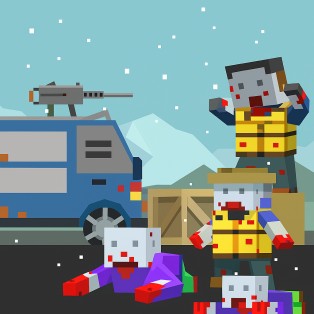
Zombie Derby: Pixel Survival combines side-scrolling driving with an undead apocalypse. Instead of escaping zombies on foot, you control a rugged vehicle across ruined highways, broken bridges, steep hills, and barricades packed with enemies. Momentum is your lifeline: enough speed can carry the car through a horde, while a poor landing or an empty boost meter can leave it stranded before the finish.
Each track mixes driving skill with resource management. Accelerate to build momentum, fire onboard weapons to clear dense obstacles, use nitro for steep climbs, and tilt the vehicle in the air so it lands on its wheels. Fuel, ammunition, armor, and traction place limits on how far a basic machine can travel. Rewards from attempts fund upgrades to the engine, wheels, weapons, and boost, gradually turning an unreliable starter car into an apocalypse-ready vehicle.
The pixel-art presentation keeps the destruction playful, but the progression has real strategic depth. Buying raw power without improving fuel may produce a fast car that cannot finish, while heavy armor can be wasted if weak wheels fail every hill. Players must learn each route and develop the vehicle together. The game is ideal for fans of upgrade-driven driving, destructive zombie action, and repeated runs where even a failed attempt earns information or resources for the next push.
Key Details:
- Genre: Side-Scrolling Driving / Zombie Survival
- Difficulty Level: Medium
- Average Play Time: 10-25 minutes per session
- Best For: Players who enjoy vehicle upgrades, physics driving, zombie destruction, and run-based progression
2. How to Play
Getting Started:
- Accelerate smoothly and preserve enough momentum for the first obstacles.
- Crush isolated zombies and fire weapons at dense groups or barriers.
- Use nitro when a hill or horde requires extra force.
- Tilt the vehicle during jumps to prepare a safe landing.
- Spend run rewards on upgrades, then retry the track and travel farther.
Basic Controls:
| Action | Control |
|---|---|
| Accelerate / Drive | Follow the displayed drive control |
| Fire onboard weapon | Use the on-screen fire control |
| Activate boost | Use the displayed nitro control |
| Balance in the air | Use the forward/back tilt controls |
Objective: Drive through zombie-filled tracks, reach each finish line, and improve vehicles enough to overcome harder terrain and enemy waves.
3. Game Features & Highlights
- ✓ Pixel-art apocalypse tracks filled with zombies and debris
- ✓ Vehicle momentum, aerial balance, weapons, and nitro in one driving system
- ✓ Engines, wheels, armor, guns, and boosts that can be upgraded
- ✓ New vehicles with distinct statistics and visual designs
- ✓ Failed runs that still support learning and future progression
4. Tips & Strategies
Beginner Tips:
- Save nitro for steep climbs or packed obstacles instead of using it on flat ground.
- Begin correcting the car's angle before it reaches the landing.
- Upgrade fuel and engine performance together for consistent distance.
Advanced Strategies:
- Fire before entering a dense horde so speed is not lost on the first impact.
- Use downhill sections to build free momentum before a climb.
- Adapt the upgrade order to the specific reason the previous run ended.
What to Watch Out For:
- Holding maximum acceleration over a jump can create an unrecoverable landing angle.
- Spending everything on weapons may leave the vehicle unable to cross the terrain.
5. Game Elements Explained
Momentum, Jumps, and Track Reading: The vehicle's speed is both offense and movement. Momentum helps crush zombies and climb slopes, but excessive speed can launch the car into a bad rotation. Read the terrain ahead and decide whether the next section demands force or control. Build speed on safe downhill ground, then reduce unnecessary input as the vehicle leaves a ramp. Use tilt controls in the air to align the wheels with the landing surface; correction should begin early because late inputs may not overcome existing rotation. Dense zombie groups drain momentum, so clear them with weapons or boost before the car becomes trapped. Repeated attempts reveal where a hill needs nitro, where a jump demands restraint, and where a horde must be thinned. Memorizing those points is as important as upgrading the machine. Consistency matters more than a single spectacular result. Repeat a dependable sequence until it becomes automatic, then introduce one improvement at a time so you can tell whether the change actually helps under pressure.
Vehicle Upgrades and Resource Balance: Upgrades solve different failure types. Engine power improves acceleration and climbing, wheels or traction help transfer that power, armor protects against impacts, weapons clear obstacles, and nitro creates short bursts of momentum. Fuel or endurance determines whether all that strength lasts to the finish. After each run, identify the limiting factor instead of buying the most exciting option. If the car reaches a hill without enough speed, power or nitro may be correct. If it travels well but stops short, fuel should lead. If hordes absorb momentum, weapons or armor become valuable. Balanced progression is usually more dependable than maximizing one statistic. New vehicles can alter the equation with different base strengths, so compare their role before replacing a well-upgraded current car. Players improve fastest when they treat every run as information. Notice the resource, route, or warning that was missed, then build the next plan around protecting that specific weakness before attempting a riskier approach.
6. Frequently Asked Questions
Q: How do I land safely after a jump?
A: Use the tilt controls while airborne and align the wheels with the slope before contact.
Q: What should I do if my vehicle stops before the finish?
A: Note whether fuel, terrain, damage, or a horde caused the stop, then upgrade the matching system and adjust boost timing.
Q: Is the game compatible with mobile browsers?
A: Driving games commonly provide touch buttons, but support depends on the embed. Desktop controls may offer finer balance.
Q: Can I save my progress?
A: Browser storage may preserve upgrades, but the source does not confirm it. Avoid clearing site data and check after a completed level.
Q: How do I unlock new vehicles?
A: Complete runs, earn currency or progression rewards, and purchase the next vehicle when its requirement appears.
7. Related Games You Might Enjoy
If you like Zombie Derby: Pixel Survival, you might also enjoy:
- Escape Road 2 - Another vehicle game where momentum and route control decide survival.
- Dead Strike - It trades the car for direct FPS combat against escalating zombie waves.
- Zombie Survival - A broader survival game with resources, traps, and varied undead threats.
Sort byNewest
Add a Comment
Fan-made hub; not affiliated with the official owners of 99 Nights.